Last Updated on September 4, 2026 by Maged kamel
Introduction to row echelon form (REF).
Our subject, as of today, is the row echelon form. And also the reduced row echelon form. We are using row matrix operations to create a new REF. The following steps are explained:
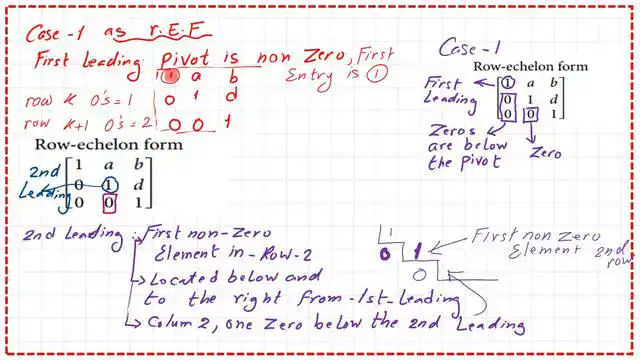
1-For the first row of the first item, the first row/first column is called the leading item, which must equal 1.
2-For the first column/2nd row and third row, all the elements are zeros.
2-For the second row, the leading item, 1, will be below and to the right of the previous row’s leading item. As we can see, the number 1 is in the 2nd row/2nd column. Put a zero below the leading item in the third row.
For the third row, we expect to have a leading 1, as in the third column. This is one definition for the RE form, quoting Steven Leon’s book Linear Algebra with Applications.
But other authors state that the leading item is nonzero, where the number could be 1 or any positive value.
Please refer to the RE form wiki for more information. The next slide shows the details of the RE form and how to create it, and it includes the two definitions.
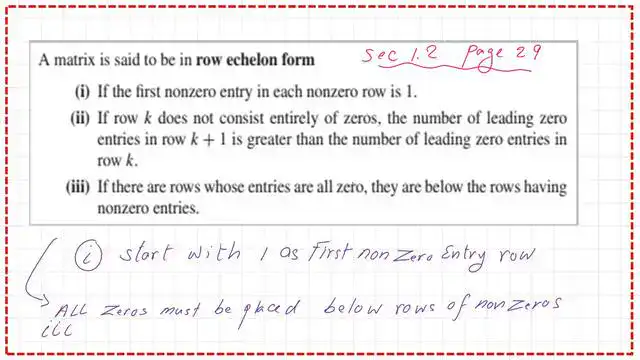
These are the three items for the REF (row-echelon form), with the leading item nonzero in the bottom row.
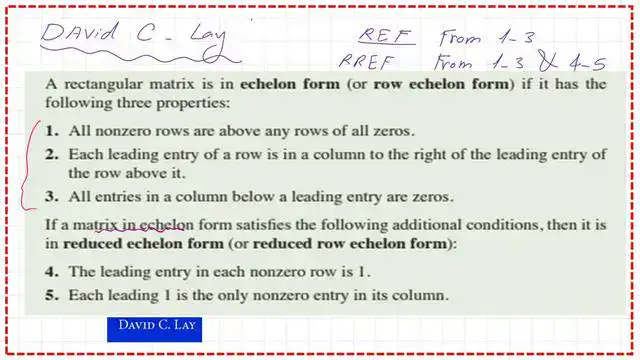
The following slide image includes a definition of the REF.
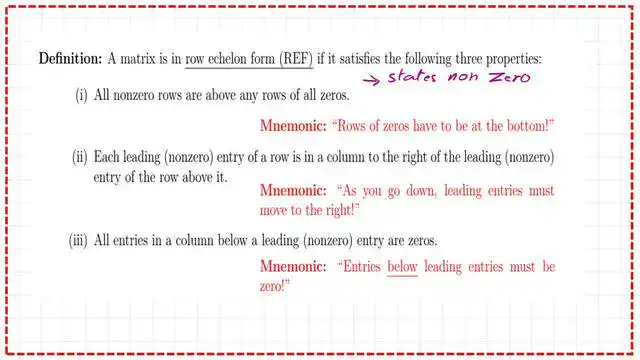
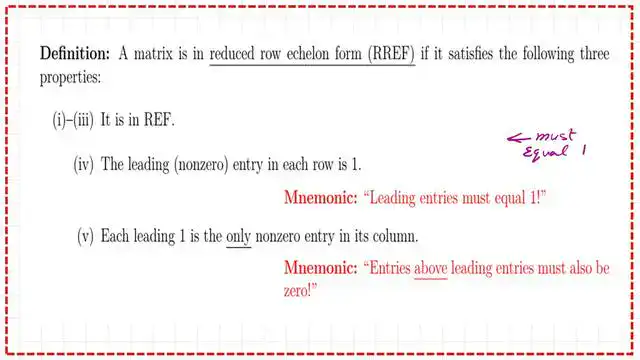
What is the RREF (reduced row echelon form)?
The RREF stands for the reduced-row echelon form. This form includes the three items from the RE form, but all leading entries must be 1s.
The column with the first leading 1 should have zeros below it. At the same time, the columns of the leading ones should include zeros above and below the leading ones.
This is the case of a 3×3 matrix in the REF. We have a diagonal matrix with three ones; the leading item is nonzero; the leading one has two zeros below it.
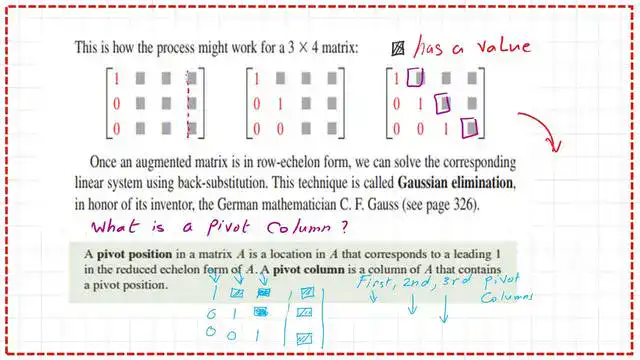
This is the augmented form of a 3×4 matrix. We have a diagonal of nonzerononzeros, with items set to ones. The solid boxes include any possible values.
The pivot column in matrix A corresponds to the leading entries. In the shown matrix, there are three leading ones, indicating three pivot columns.
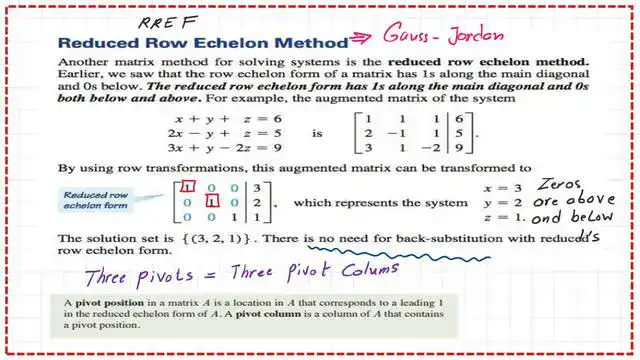
The use of the RREF to solve a system of linear equations.
The RREF echelon form is the method Gauss-Jordan uses to obtain solutions to linear systems, avoiding back-substitution.
Step 1: Create an RE form using row operations.
Step 2: Use the leading term in the third row to create a zero for the elements above it.
Step 3: Use the second row’s leading term to create a zero for the element above it.
Based on these operations, the values in the fourth column will change, and at the end, we can obtain the values of the unknowns directly.
For instance, if we have the following system of linear equations: x+y+z=6 & 2x-y+z=5 and 3x+y-2z=9.
Perform row operations to obtain an RREF, and we will get the augmented matrix in the arranged form.
This new arrangement will give us the values x = 3, y = 2, and z = 1. There is no need to use the back substitution to get these values.
Another example of the Reduced Echelon form.
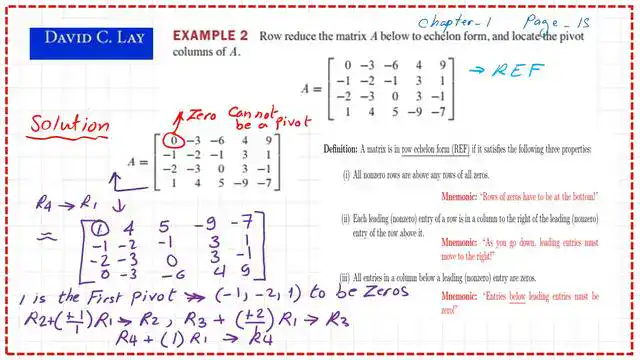
In the given matrix A, which has a dimension of 4×5, row reduction must be performed to locate the pivot columns.
The first row has a leading term of zero, which is unacceptable, so we will replace it with row 4, which has a leading term of 1 and is accepted as a nonzero entry.
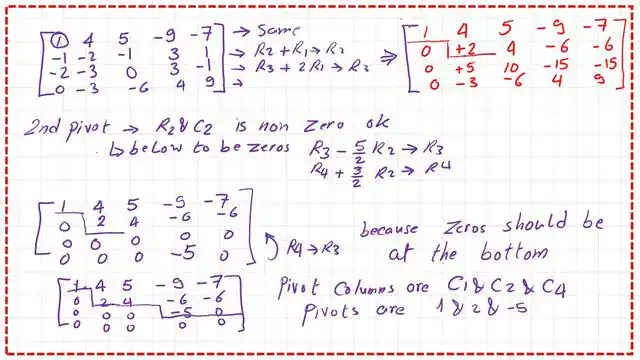
We will perform a series of row operations to set the entries below the first leading entry to zero. These steps create the reduced echelon form for a 4×5 matrix. The shape of the reduced echelon form is shown in the next slide image.
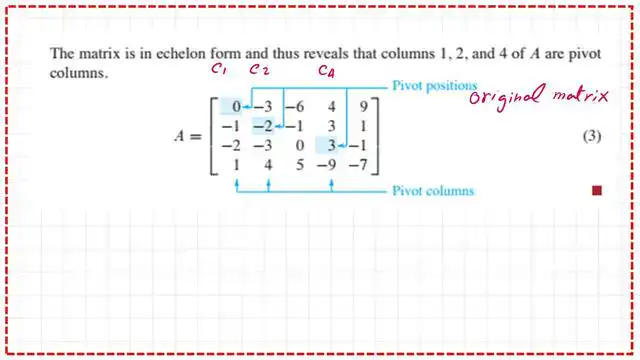
We have the third row containing five zeros, which we cannot accept, so we will swap the third and fourth rows to satisfy the RREF condition. The positions of the leading items and the pivot columns are shown in the next slide. the leading terms are 1& 2& -5 which are a11 & a22 and a34.
We have used the REF to identify the positions of the leading terms and the pivot columns so that we will return to the original matrix A with this information on the next slide.
The PDF data for this post can be viewed or downloaded via the next document.
In the next post, we will look at practice problems for back substitution.
This is a link to the matrix calculator.
For a useful external link, math is fun for the matrix part.